



Register a System
How-ToStep-by-step guides covering key operations and common tasks
How to register a TrueNAS system in TrueNAS Connect using the Add System dialog.
less than a minute
Registering a System
After logging into TrueNAS Connect, you are prompted to complete the system registration using the Add System dialog.
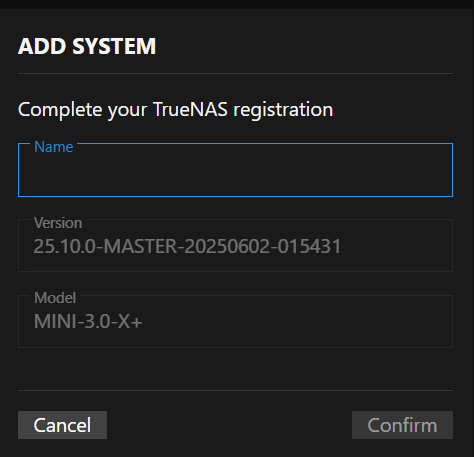
Enter a name for your system, such as the host name or a name that helps identify the purpose of the system. For example, backup1, TNserver1, etc. Click Confirm to add the system.
To register another system, begin in the TrueNAS system UI. Log in to the TrueNAS system UI as an administrator with full admin privileges. Follow the instructions provided in Setting Up TrueNAS Connect to log into TrueNAS Connect using the same OAuth account used to set up TrueNAS Connect.
Repeat this for each system you want to add to TrueNAS Connect.